

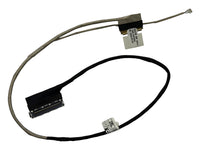
This step-by-step guide shows how to replace the LCD video cable in your Asus ROG Strix G G531GD and similar models. Set aside some time, work on a clean surface and check the part number first.
✅ View the replacement part: 14005-03070100
Symptoms that point to this part
- The image flickers or disappears when you move the lid
- Lines or colour bands on the screen
- The display stays black, but an external monitor works
Compatible models
- Asus ROG Strix G G531GD
- Asus ROG Strix G G531GT
- Asus ROG Strix Scar III G531GW
Part number: 14005-03070100
Model: 1422-03C30A2
Laptops with the same model name can have different internal versions. Compare the part number and connector on your old part with the product photos before ordering.
⚠️ Before you start
This repair involves opening your laptop and may void any remaining manufacturer warranty. Screw positions and access differ between versions, so follow your model's service manual where it differs from this guide. Proceed only if you are comfortable working with static-sensitive electronics.
🧰 Tools and materials
- Phillips screwdriver (PH0 or PH1)
- Plastic spudger or opening pick
- Thin tape for the connector
- Replacement LCD video cable: 14005-03070100
- Anti-static wrist strap (recommended)
🔌 1. Power off and unplug
- Shut the laptop down completely.
- Disconnect the charger and all connected devices.
- Hold the power button for a few seconds to discharge remaining power.
📦 2. Remove the bottom cover
- Place the laptop upside down on a soft surface.
- Remove all screws from the bottom panel. Some may be hidden under rubber feet.
- Release the cover carefully with a plastic tool.
🔧 3. Disconnect the battery
- Unplug the battery connector from the motherboard.

🔧 4. Open the display
- Unplug the video cable from the motherboard.
- Remove the screen bezel carefully with a plastic tool, then the screws holding the panel.
- Lay the panel face down on the keyboard, on a soft cloth.
🔧 5. Replace the cable
- Lift the tape on the panel connector and unplug the old cable.
- Route the new cable along the same path through the hinge.
- Plug in both ends and tape the panel connector.
🔧 6. Refit the display
- Fit the panel and bezel back, then reconnect the battery.
🧩 7. Reassemble the laptop
- Fit the bottom cover back and tighten all screws.
- Reconnect anything you removed.
⚙️ 8. Test the repair
- Connect the charger and power on the laptop.
- Open and close the lid slowly and check that the image stays stable.
Frequently asked questions
How do I know this part fits my laptop?
Match the part number printed on your old part and compare the product photos. The model name alone is not always enough.
🎉 Done!
Your Asus ROG Strix G G531GD and similar models should be working properly again. Need the part? Order the LCD video cable here. It comes with a 6-month warranty.